Fitbit Versa vs Apple Watch Series 4: Which smartwatch is right for you?

Two of the most popular smartwatches on the market are the Apple Watch and Fitbit Versa. While Apple has been making smartwatches for years, Fitbit is still relatively new to the space. Even so, the Fitbit Versa was one of the sleeper hits of 2018.

Can Fitbit really compete with the new Series 4 Apple Watch? Which is best for you? Find out in our Fitbit Versa vs Apple Watch comparison.

About this comparison: I’ve been using the Fitbit Versa on and off since it launched in 2018, and it’s recently been paired with my Google Pixel 3. It’s also running the latest Fitbit OS 3.0 (version 32.33.1.30) software. I’ve been using the Apple Watch Series 4, paired with an iPhone X, for roughly two weeks. My Apple Watch has been running watchOS version 5.1.3 (16S535).
Show More

Fitbit Versa vs Apple Watch: Design and hardware

Both the Apple Watch and Fitbit Versa have very approachable designs that will appeal to a lot of people. 

The Apple Watch features a more rectangular case with rounded corners, with a digital crown and a single physical button on the right side. The Versa has more of a squircle-shaped case, with a square display and three physical buttons.

They don’t exactly look like each other, but it’s hard not to notice a few Apple Watch-esque design cues in the Versa. It wouldn’t be too farfetched to call the Versa sort of an Apple Watch Lite.
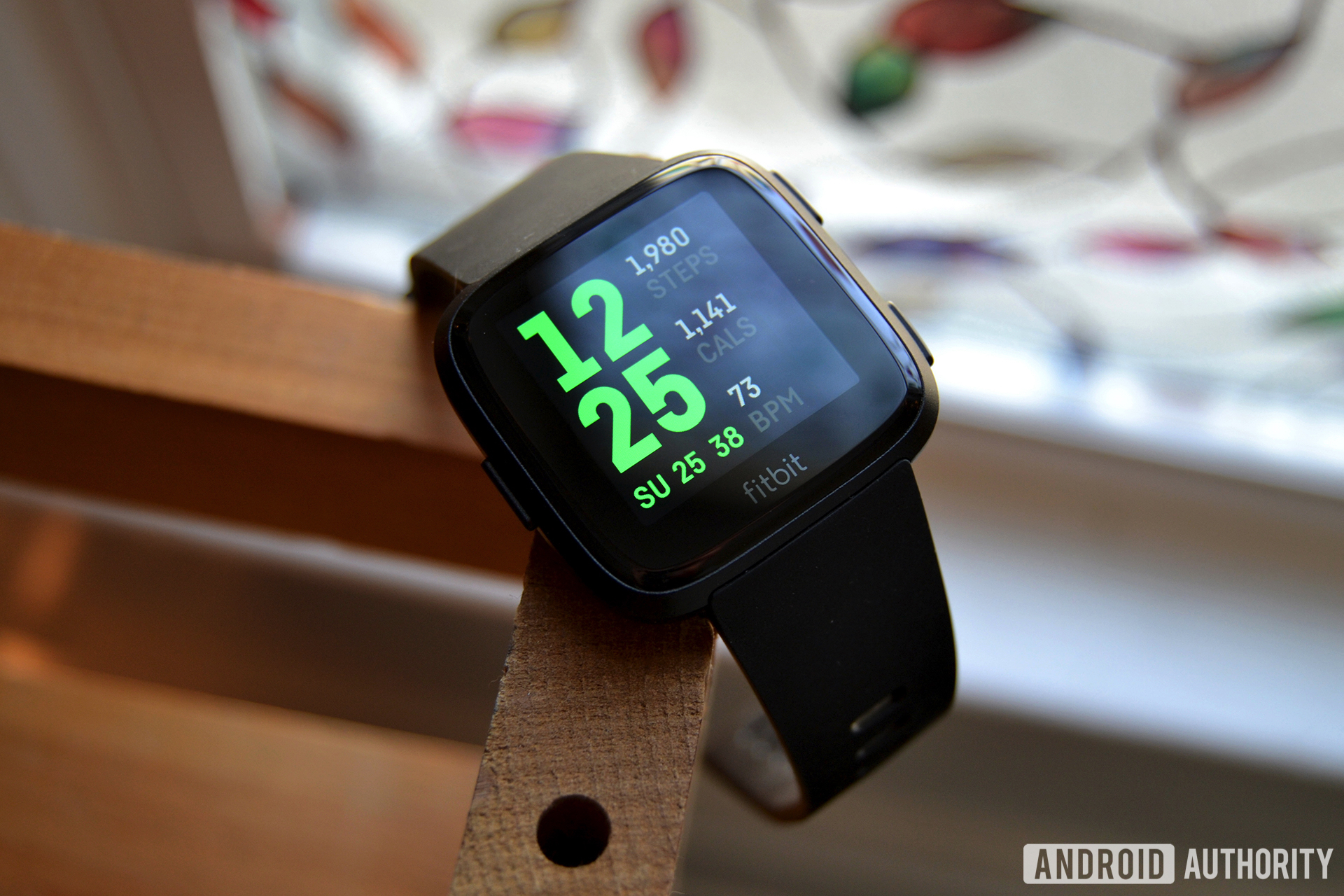
The Apple Watch comes in two sizes — 40 and 44mm — and comes with the appropriate sized strap to fit your wrist. The Versa has one sizing option, but ships with both small and large bands in the box. The Versa is a bit thinner than the latest Apple Watch, though — it’s just 11.2mm. Apple claims the Series 4’s thickness is 10.7mm, but I don’t think it includes the heart rate sensor in that measurement. My Versa is overall thinner than my Apple Watch, despite Apple claiming otherwise.

Fitbit Versa vs Apple Watch

As mentioned, both support interchangeable straps, though both implementations are proprietary. Apple has a slew of different styles of watch bands, including silicone, nylon, stainless steel, and more. Fitbit has many of these options too, but not nearly as many color or material choices as Apple.

Also, it’s a small thing, but changing Apple Watch straps is a breeze — the company’s proprietary locking mechanism is really well thought out. Changing straps on the Versa is actually really frustrating. Have fun getting the leather straps attached without throwing it across the room.

Fitbit Versa step counter

Now is as good a time as ever to mention overall build quality. While both watches have their similarities, the Apple Watch feels extremely well built compared to the Versa. It might cost a few hundred dollars ($400 to be exact), but Apple clearly does something with that money. Literally every part of the watch — the aluminum case, the OLED display, the rotating crown, and especially the haptics — feels great.

The Fitbit Versa feels great, as long as you don’t compare it side by side, which is understandable. This is about half the price as the Apple Watch after all. One can’t expect the same build quality. It’s not bad, just not in the same league.

Apple Watch notifications

Don’t miss

That level of quality extends to the displays as well. The OLED Retina screen on the Apple Watch is fantastic. You’ll get deep blacks and vibrant colors, and the panel also supports Force Touch. The large and small screens also have a higher resolution — 368 x 448 or 324 x 394 — than the Fitbit’s 300 x 300 screen. Again, the 1.34-inch LCD screen on the Versa isn’t bad, but you’ll notice a big difference between the two if you put them side by side.

Despite the battery-saving properties OLED has over LCD, battery life is where things take a turn. The Apple Watch lasts around a day on a single charge, maybe a day and a half. You might even have to top it up sometime during the day if you want it for sleep tracking. That’s probably why Apple doesn’t even bother with developing sleep tracking tech — the Apple Watch won’t track sleep out of the box, but some third-party apps will do the trick.

The Versa lasts a bit over four days on a single charge, and that’s with activity tracking, sleep tracking, and the heart rate sensor activated at all times. I can’t wait until all smartwatches last this long.

Fitbit Versa vs Apple Watch: Smartwatch features

Fitbit Versa vs Apple Watch

Apple’s and Fitbit’s approaches to software are entirely different. Again, that has a lot to do with how much experience company has in the smartwatch space.

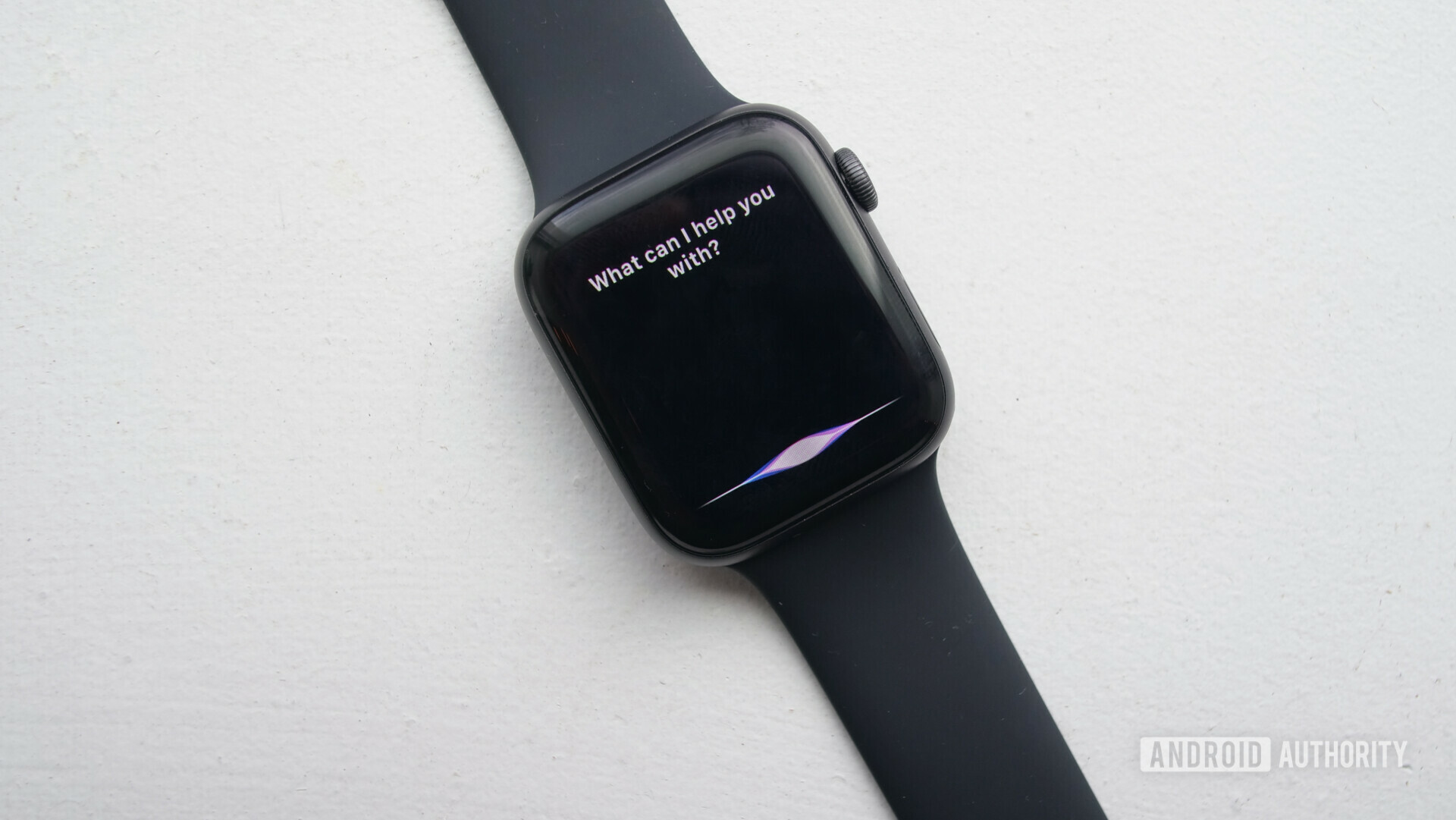
The Apple Watch’s software is clean and fast, though it’s nearly too complex (more on that later). One press on the digital crown will bring you to the honeycomb (all apps) screen, while a long press will activate Siri. For as much as people like to hate on Siri, it’s way faster than Google Assistant on any Wear OS watch I’ve tried.
Apple Watch siri

Apple’s voice assistant has come a long way over the years. It’s definitely good enough to answer questions and perform simple requests with smart home devices, though its ecosystem notably lacks the breadth of smart home device support of Google and Amazon. It’s more than what the Versa offers, though. There’s no voice assistant baked into the Fitbit smartwatch, so you’ll have to do everything the old-fashioned way: by swiping and tapping.

To a point, that’s to be expected. Fitbit OS is only a few years old. While it has vastly improved from the version that launched on the Ionic in 2017, it’s not perfect. Even the latest Fitbit OS 3 lags while swiping through menus and pulling down the notification shade. It is an overall simpler OS though, so if you don’t need everything available to you right on your wrist, the Versa should fulfill your smartwatch needs just fine.

One good example of Apple going a bit overboard with this is the much-criticized honeycomb screen, its confusing version of an all-apps page. It displays all your apps in a honeycomb-style grid. You’re supposed to scroll around and tap the app icon you’d like. It’s not nearly as fast at finding apps in a list view, but luckily you can switch to list view pretty easily.

If your smartwatch use revolves around third-party applications and services, the Apple Watch is by far your best option. Popular apps like Audible and Runkeeper, as well as third-party weather apps like Dark Sky are all available on watchOS, but not on Fitbit OS. Fitbit’s app ecosystem is growing, but it’s still far behind what Apple offers now. Hopefully that will change soon — Fitbit recently gave developers access to two new APIs, which should allow them to more easily create higher quality applications.

Also read: Fitbit Versa vs Ionic: What’s the best Fitbit smartwatch?

Both smartwatches have music storage built in, as well as support for a handful of music streaming apps. The Apple Watch has about 2GB of space for local music storage, and you can also listen to Apple Music and Apple Podcasts from the watch.

The Versa has about 2.5GB of local music storage, as well as support for Pandora and Deezer playlists. There’s no streaming option though — you’ll have to download the playlists before you go out for your workout. That’s about it for music options, but Fitbit of course says more music partners will be added in the future.

fitbit versa quick replies

Google Allo Smart Replies on the Versa

Both smartwatches allow you to receive and respond to messages from your smartphone, but there are some limitations. While the Fitbit Versa is compatible with both iOS and Android, you can only respond to messages when paired with an Android phone. The Apple Watch has the advantage of a built-in microphone, so you can respond to messages with your voice, which is handy sometimes.

Read more: How to use quick replies on the Fitbit Versa and Ionic

Both smartwatches connect to your smartphone via Bluetooth, and both support Wi-Fi. The Apple Watch is also available in a cellular variant, which is great news for those who want to leave their phone at home and still receive calls and messages.

Finally, we have mobile payments. Each company has its own contactless payment service. Apple Pay is obviously available on the Apple Watch, while Fitbit Pay is, you know, on the Fitbit. Apple Pay has been around for a long time now, and it shows — a ton of banks and card companies support it. Fitbit Pay’s list of supported banks and card companies is growing by the week, but as I mentioned previously, it’s a work in progress.

Fitbit Pay is only available on the special edition model here in the U.S., which costs $30 more than the standard model. I’m really hoping there’s just one all-encompassing model with the Versa 2, because it sort of feels like a cash grab to make people spend extra for this feature. The special edition Versa is still $170 less than the cheapest Series 4 Apple Watch, so I suppose that’s a win for Fitbit!

Fitbit Versa

It shouldn’t be surprising Apple still doesn’t allow third-party watch faces, so you get what Apple gives you. That’s not horrible though — especially with the Series 4, Apple includes plenty of great, customizable watch faces. My favorites are the Infograph Modular and Fire/Water faces. It’s also super easy to switch between watch faces. Just swipe left or right to select your favorites, or you can customize your own on the watch or in the Apple Watch app.

Fitbit offers a small set of its own watch faces, which are okay. They’re certainly not as well thought out or frankly as cool as anything on the Apple Watch. However, Fitbit lets third-party developers make their own watch faces, so the options are seemingly endless.

The only downside here is the Versa can’t load more than one watch face at a time, so you have to select a new one in the app and wait for it to transfer to your watch (which can take a long time). Even worse, you can’t choose from a “favorites” or “recents” section, so you actually have to go hunting for a watch face and customize it all over again if you want to go back to a previous watch face. As someone who changes watch faces all the time, this is a big headache.

Fitbit Versa vs Apple Watch: Fitness tracking

Fitbit Versa vs Apple Watch - displays

Fitbit is one of the biggest names in fitness tracking devices, so it’s no surprise the Versa is a perfectly capable fitness tracker. Apple has also made strides in fitness and health tracking over the last few years, and it shows with the Series 4 Apple Watch.

Both devices will track your steps, calories burned, heart rate, and active minutes. Both can also track your sleep, but you’ll have to download a third-party app for the Apple Watch for sleep tracking.. Alternatively, the Versa is one of the best sleep trackers out there. Feel free to read about the specifics in our full review.

Both watches will also track a wide variety of different sport profiles. There are some differences, but both at least track basics like running, biking, treadmill, yoga, elliptical, and walking. They both track pool swimming too (thanks to their 5ATM water resistance ratings), but the Apple Watch can also track open-water swims. There are far too many sport profiles to list here, so you can check out the full list of Versa sport profiles here and Apple Watch sport profiles here.

I tested both smartwatches during a 48-minute cardio exercise (an Insanity video that was way too difficult), which you can see below. I also tested the watches against my Polar H10 heart rate strap as a control for the heart rate readings.

fitbit versa vs apple watch vs polar h10 heart rate screenshots

Overall, the Versa and Apple Watch’s heart rate sensors picked up on most of the big trends throughout the workout. A few minutes in, my heart rate shot up quite a bit — the H10 reported this spike at a max of 160bpm. The Apple Watch recorded it to be ~175bpm, while the Versa recorded it as a high 189bpm (my max is 193). Later on, the watches showed another heart rate peak topping out at around 170bpm, even though the H10 recorded it at 163bpm. The smartwatches were much more accurate when my heart rate wasn’t nearing peak. The H10 reported my average heart rate to be 133bpm, while the Apple Watch’s was 137 and the Versa’s was 136.

As we’ve reported previously, wrist-based heart rate sensors aren’t going to be as accurate as chest heart rate sensors. Too many factors can throw the numbers off, whether that be skin tone, body hair, or how tight the device is around your wrist. The important thing is they both picked up on the major trends.

For those wondering, calorie burn was also in the same ballpark for each device. I burned 549 calories according to the Apple Watch, 534 according to the Versa, and 571 according to the Polar H10.

If you’re unsatisfied with those heart rate numbers, you can pair a third-party heart rate sensor with the Apple Watch to get more accurate readings. The Fitbit unfortunately doesn’t have this feature.

Related

The Apple Watch is probably the better option for runners, as all models (after Series 1) come with a built-in GPS. The Fitbit Versa only has Connected GPS, so you’ll have to bring your phone on a run if you want accurate distance and pace metrics.

If you need to keep an eye on your heart health, the Apple Watch is, again, probably your best option. It has an FDA-approved electrocardiogram, and it’s one of the few consumer devices to have one built-in. ECGs can help users detect serious heart problems like atrial fibrillation (AFib), and warn you when you’re experiencing heart palpitations. Traditionally, ECGs are quite expensive at the doctor’s office, which of course makes it harder for people without insurance to get. By no means should this be a replacement for attending regular doctor visits if you do have heart problems, but it is still a nice feature to help keep an eye on things.

Fitbit Versa vs Apple Watch: Which is the better buy?

Fitbit Versa vs Apple Watch side by side

Buying one smartwatch over the other, at least for this comparison, depends on one major factor: what smartphone you own. If you have an Android phone and aren’t keen on buying anything powered by Wear OS or the latest Samsung watch, buy the Fitbit Versa, or the Fitbit Ionic if you need something more powerful. The Apple Watch won’t work with your phone, so you’ll have to look elsewhere.

There’s no question: The Apple Watch is the clear winner. But at what cost?

Things become more difficult if you own an iPhone. Buy the Apple Watch if you want the best of the best. If your budget is $200 and not a penny more, the Versa is an incredible option. Just remember iOS users can’t respond to notifications from the Versa.

I can’t say which is the better smartwatch. Both are really great in their respective areas. The Fitbit Versa is a fantastic value for around $200, and the Apple Watch Series 4 is a fantastic all-around smartwatch if you don’t mind the cost. For you phone nerds, this is like comparing the Pocophone F1 against the Samsung Galaxy Note 9 — you can do it, but there are a lot of things you need to consider before claiming one is better than the other.

That’s it for our Fitbit Versa vs Apple Watch comparison. Do you own either of these smartwatches? If so, I’d love to hear from you in the comments.

Affiliate disclosure: We may receive compensation in connection with your purchase of products via links on this page. The compensation received will never influence the content, topics or posts made in this blog. See our disclosure policy for more details.

Source: Android Zone

The post Fitbit Versa vs Apple Watch Series 4: Which smartwatch is right for you? appeared first on TuneMaster.ml.

What email client do you use? (Poll of the Week)

Last week’s poll summary: Last week, we asked you how long you usually keep your smartphone before upgrading. Out of over 56,200 total votes, roughly 34 percent of voters said they keep their phones for over two years, while 33 percent said they keep their phones for 1-2 years before upgrading. Around 17 percent of voters buy a new phone whenever their old one breaks.


If you’ve been paying attention to the news over the past few months, you may find yourself looking for a new email app.

Google’s Inbox app, which has garnered over 10 million downloads since its launch in 2014, is shutting down this March. Some of its features have made their way to the Gmail app, while some are still in question. Plenty of people still aren’t entirely on board with the standard Gmail app though, which means third-party clients the only way to go.

Related

One of the most popular third-party email apps is Newton. After leaving the Play Store in September 2018 and getting acquired by Essential shortly thereafter, the popular email app is now back on the Google Play Store. But with its future in question and the sting of the new $50 yearly subscription, some users are afraid to go back to their once-beloved email app.

I wanted to open the question to our readers: What email app do you use, and why? Do you stick with Gmail, the stock email app on your phone, or something else? Cast your vote in the poll and be sure to speak up in the comments!

Note: There is a poll embedded within this post, please visit the site to participate in this post’s poll.
Source: Android Zone

The post What email client do you use? (Poll of the Week) appeared first on TuneMaster.ml.

Let’s take a look at what’s leaving Hulu (February 2019)

best live tv apps

If you’re a Hulu subscriber, there’s plenty to get excited about each month with new TV shows and movies. There’s just as much to dread, however — Hulu also removes content at the end of each month. Let’s take a look at some highlights and the full list of content that Hulu will remove.

We will continually update this list over time.

Lethal Weapon (1987)

There’s not much that has to be said about Lethal Weapon, one of the best buddy cop movies of all time. This is the movie that kickstarter a franchise that lives on today with the Lethal Weapon TV series on Fox. Lethal Weapon heavily influenced movies like Hot Fuzz, Rush Hour, Tango & Cash, and Bad Boys, which had their own successes. The movie also further cemented Mel Gibson and Daniel Glover’s acting careers. If you’re into absurd action, look no further.


Apollo 13 (1995)

Before 2013’s Gravity, 1995’s Apollo 13 showed everyone how to make a fantastic and incredibly accurate movie set in space. The movie deals with the 1970 Apollo 13 lunar mission, which never made it to the Moon due to an oxygen tank that exploded during flight. Even with severe damage to some of the onboard systems, the Apollo 13 crew returned safely to Earth. The movie re-tells the story in a gripping manner, thanks to director Ron Howard and the performances from Tom Hanks, Kevin Bacon, Bill Paxton, Gary Sinise, and the rest of the cast.


Leaving February 28

Movies

  • 12 Dates of Christmas (2011)
  • A Mermaid’s Tale (2016)
  • All Over the Guy (2001)
  • Apollo 13 (1995)
  • Bad Girls (1994)
  • Bad Girls from Mars (1991)
  • Basic Instinct (1992)
  • Beetlejuice (1988)
  • Best Seller (1987)
  • Beverly Hills Vamp (1989)
  • Blow Out (1981)
  • Blue Jasmine (2013)
  • Christmas Cupid (2010)
  • Deja Vu (2006)
  • Dr. Doolittle: Million Dollar Mutts (2007)
  • Dream House Nightmare (2017)
  • Dressed to Kill (1980)
  • Exposed (2016)
  • Hitman’s Run (1999)
  • It’s Us (2016)
  • Joey (1988)
  • King of the Mountain (1981)
  • Leaving Las Vegas (1995)
  • Lethal Weapon (1987)
  • Lethal Weapon 2 (1989)
  • Lethal Weapon 3 (1992)
  • Lethal Weapon 4 (1998)
  • Line of Duty (2013)
  • Living by the Gun (2011)
  • Malena (2000)
  • Manhattan Night (2016)
  • Mansfield Park (1999)
  • Message in a Bottle (1999)
  • Miracle on 34th Street (1994)
  • Mullholland Falls (1996)
  • Operation Condor (1986)
  • Operation Condor II: The Armour of the Gods (1991)
  • Radio Days (1987)
  • Ride (1998)
  • Righteous Kill (2008)
  • Rob Roy (1995)
  • Silent Tongue (1993)
  • Snow (2004)
  • Snow 2: Brain Freeze (2008)
  • Snowglobe (2007)
  • Spy Game (2001)
  • Switchback (1997)
  • Teresa’s Tatoo (1994)
  • Ulee’s Gold (1997)
  • We are Marshall (2006)
  • Wicker Park (2004)
  • With a Friend like Harry (2000)

Source: Android Zone

The post Let’s take a look at what’s leaving Hulu (February 2019) appeared first on TuneMaster.ml.

The Google Pixel’s February 2019 update includes more than just security

Google Pixel 3 XL vs Pixel 3 screen

Yesterday, Pixel owners were happy to learn that Google is pushing out the February security patch to their devices. What they didn’t know is that the update surprisingly includes some new user-facing changes and features, reported 9to5Google.

First up is the About phone section, which is now its own section and sits above Tips & support in the main Settings screen. Previously, About phone was the first option in the System section.

In addition to being its own main section, About phone also includes a new Safety & regulatory manual option. The new option provides a copy of the printed Safety & Warranty booklet that’s included with every device.


The changes don’t stop there — the Settings menu features a new layout and icons. The colorful icons are a nice reprieve from the all-white background that Google goes for with its updated Material Design aesthetic.

You can also schedule a device restart after you download and install an update. Kind of.

Editor’s Pick

The software keeps in mind whether the device is in use or idle. As such, any update you get will pause if you’re using your device and visit the System updates section. You can manually resume the download and even tap the new Restart after 2:00AM option on the bottom left once the update is done.

Selecting the new option restarts your device between 2:00AM and 4:00AM your time. You can’t yet pick any time you want, but we’re hoping that becomes an option with a future update.

The February security patch is now rolling out to supported Pixel devices and the Essential Phone.

Source: Android Zone

The post The Google Pixel’s February 2019 update includes more than just security appeared first on TuneMaster.ml.

John Legere promises 3 years of ‘same or better rate plans’ after Sprint merger

An image of John Legere and other T-Mobile employees at the Senate Judiciary Subcommittee meeting on June 28, 2018. Fortune

  • T-Mobile CEO John Legere posted an open letter to the FCC discussing the proposed T-Mobile-Sprint merger.
  • In the letter, Legere promises not to raise rates above their current standing for the next three years, should the merger go through.
  • Legere also promises to remain true to customers and its “Uncarrier” ideology.

In a new open letter sent to Ajit Pai at the Federal Communications Commission, T-Mobile CEO John Legere makes a few new promises surrounding the proposed T-Mobile-Sprint merger.

In the letter, Legere calls out critics of the merger whom he says are “largely employed by Big Telco and Big Cable.” He says that these critics erroneously cling to the assumption that the T-Mobile-Sprint merger will cause consumers to pay more for wireless service and/or get fewer features with their plans.

In response to this, Legere makes a very clear promise that that will not happen, at least for a certain amount of time:

To remove any remaining doubt or concerns about New T-Mobile’s prices while we are combining our networks over the next three years, T-Mobile today is submitting to the Commission a commitment that I stand behind – a commitment that New T-Mobile will make available the same or better rate plans for our services as those offered today by T-Mobile or Sprint.

Editor’s Pick

Considering this letter was posted yesterday, February 4, 2019, that would mean entry-level prices would not exceed the base-level $70 unlimited plan T-Mobile currently offers, which includes all taxes and fees in the price. Ostensibly, customers signing up with the new T-Mobile if and when the merger goes through would pay no more than this until at least 2022.

However, this promise likely wouldn’t cover new technologies, such as the 5G service that’s on the horizon. Since that service isn’t up-and-running yet, it could still be quite expensive and Legere wouldn’t have broken this promise.

Depending on how much you believe what Legere says, it does seem that he is passionate about keeping his loyal customers happy:

We are the Un-carrier. If we broke faith by raising rates and cutting back benefits, we would lose our loyal customers and destroy the future of our brand. I want to assure you that we would never do this. My management team and I can make this personal commitment because we believe in delivering on our promises, and we know if we do not, we will lose credibility and the trust of our customers.

The proposed T-Mobile-Sprint merger has already received approval from the Treasury Department and is awaiting approval from the Department of Justice and the FCC.

NEXT: What would the T-Mobile-Sprint merger mean for you?

Source: Android Zone

The post John Legere promises 3 years of ‘same or better rate plans’ after Sprint merger appeared first on TuneMaster.ml.

Fitbit Charge 3, Versa, and Ionic are on sale through Valentine’s Day

Valentine’s Day is right around the corner, and tech gifts will last a whole lot longer than flowers or chocolates. That’s why these Fitbit deals the company is currently offering are well worth a look if you or your crush are in need of a new smartwatch or activity tracker.

You’ll also get free two-day shipping on any order over $50 with the promo code CUPID, which is a nice gift unto itself.

Fitbit’s latest activity tracker — the Fitbit Charge 3 — is getting marked down by $20. That discount applies to both the regular edition and the special edition (which adds support for Fitbit Pay). The regular edition is $130 (marked down from $150) and the special edition is $150 (marked down from $170).

Editor’s Pick

The Fitbit Versa — one of Android Authority’s favorite smartwatches — is getting marked down by $30. That means the regular edition is $170 (down from $200) and the special edition is $200 (marked down from $230).

Fitbit is also knocking $40 off its previous-generation smartwatch, the Fitbit Ionic.

Click the button below to see all the Fitbit deals on offer! Just remember to use the discount code CUPID during checkout.

Source: Android Zone

The post Fitbit Charge 3, Versa, and Ionic are on sale through Valentine’s Day appeared first on TuneMaster.ml.

Fire up the grill and play music from Sonos’ new outdoor speakers

Sonos outdoor speaker product image at an angle.

Sonos The Outdoor Speaker pair, part of the Architectural by Sonance, is completely weatherproof.

Sonos and Sonance, a company recognized for its inconspicuous wall and ceiling-integrated speaker systems, have partnered to create the Sonos Architectural by Sonance, a collection of home speakers designed to blend seamlessly into your environment. With the overarching announcement comes three pairs of speakers: In-Ceiling, In-Wall, and Outdoor, all of which may be paired to the Amp for simple home audio streaming.

Editor’s Pick

The company’s debut outdoor speaker boasts a weatherproof design, meaning you can listen to music outdoors year-round. It’s resistant to humidity, water, salt spray, heat, UV rays, and freezing temperatures. Listeners may power three pairs of Sonos by Sonance Architectural speakers with one Sonos Amp, which is encouraged to get the most out the system. In doing so, users benefit from a one-stop app that facilitates easy audio streaming and AirPlay2 control. What’s more, TruePlay technology analyzes the size of the room as well as any physical obstacles to produce an appropriately equalized sound for a given space.

Its In-Ceiling speakers are designed for spacious areas and can be painted to match your ceiling for further camouflage. Sonos offers these in a round or square build, while the In-Wall speakers are only available in a rectangular shape. However, they too can be painted.  

Sonos outdoor speaker lifestyle image of it mounted onto an outdoor wall.
Sonos in-wall speakers lifestyle image. The speakers are flanking a large wall-mounted TV surrounded by wood shelving.
Lifestyle image of Sonos In-Ceiling speakers.
Sonos In-ceiling speaker product image on white background.
Behind the grill of the In-Wall Sonos speaker.
Sonos TruePlay ceiling speakers.

Currently, you may sign up for notifications regarding the Outdoor Speaker pair’s availability, which will retail for $799. The In-Ceiling and In-Wall speaker pairs are available for pre-order and will be delivered by February 26; each pair retails for $599.

Up next: Sonos One review

Source: Android Zone

The post Fire up the grill and play music from Sonos’ new outdoor speakers appeared first on TuneMaster.ml.

Essential brings Newton email client back with same $50 price tag

best email apps for android

The Newton email app is back! Without warning, the previously-removed application is suddenly back on the Google Play Store, along with the message “We are thrilled to be back.” The popular email app was removed in September 2018.

While no announcements have been made, the comeback likely has to do with Essential acquiring CloudMagic — creators of the Newton email app — back in December. Although we can’t be certain, it’s likely that CloudMagic threw in the towel and then Essential stepped in to buy the company for relatively cheap. Now, the app is back online with almost no changes — in fact, your previous Newton login credentials will work with this new version.

Of course, along with the previous Newton functionality comes that Newton price — $50 per year to use the app after you finish out your free 14-day trial.

Editor’s Pick

Since Newton has a diehard following, it’s likely there are plenty of people all-too-willing to pay that price. Perhaps that’s why Essential saw an opportunity in buying the company.

We assume a statement from Essential and/or CloudMagic is coming soon regarding the re-launch of Newton. Perhaps that will shed some light on what we can expect in the future from the email app.

In the meantime, what do you think? Are you glad to see Newton come back, or are you still feeling burned by the rocky history of CloudMagic? Let us know in the comments.

Source: Android Zone

The post Essential brings Newton email client back with same $50 price tag appeared first on TuneMaster.ml.

Google’s tips for Safer Internet Day are genuinely helpful

  • Google has shared some tips for improved online security.
  • Most of these tips, such as unique passwords and two-step verification, are very useful.

It might be hard for some to listen to Google when it comes to account protections — the company continually receives flak for its approach to privacy. That said, Google’s tips for Safer Internet Day seem like common sense suggestions that everyone should follow.

First up, you should be using unique passwords for each of your accounts. We understand the convenience of one password for multiple accounts, since you don’t have to remember nearly as much. That said, it’s game over for the rest of your accounts if a bad actor gains access to just one of them.

That hasn’t stopped most of you from re-using passwords, though. According to Google and Harris Poll’s national survey with 3,000 respondents, 65 percent re-use the same password for multiple accounts.

It doesn’t help that 60 percent of respondents also said they have too many passwords to remember. 49 percent of respondents often forget their passwords, with 50 percent writing their passwords down on paper.

Editor’s Pick

To that end, you should look into a password manager if you have several online accounts. Some of the more well-known options include LastPass, 1Password, Dashlane, and Enpass. These password managers generate strong passwords, save passwords for future logins, and generally feature cross-platform support.

The next tip is to establish a recovery phone number or email address. That’s what you’ll use in the event that you’re locked out of your account and want to regain access to it.

The third tip is one of the more important ones — set up two-step verification. A growing number of online accounts now use two-step verification that places a secondary factor on top of your normal login credentials. This could be a code sent to your phone via SMS, a code generated in an app like Authy or Google Authenticator, or approving the sign-in from a different device.

The last two tips are more Google-specific — the Security Checkup and Be Internet Awesome.

The Security Checkup looks at four things — the number of devices where you’re signed into your Google account, recent security events, two-step verification, and third-party access. Meanwhile, Be Internet Awesome is Google’s initiative that lets parents and their kids learn about online safety.

Do you have any smart tips for staying safe online? Let us know in the comments!

Source: Android Zone

The post Google’s tips for Safer Internet Day are genuinely helpful appeared first on TuneMaster.ml.

How to Choose the Best Domain Name (11 Tips and Tools)

Choosing the right domain name for your website is crucial for your success. If you choose the wrong domain name, then it can be a hassle to switch later on without hurting your brand and search rankings.

That’s why it’s extremely important that you choose the best domain name from the start.

When first starting out, it can be hard to come up with catchy business name ideas with a perfect domain name.

In this article, we’ll share all the tools and tips you need to get domain name ideas, choose the best domain name, and register your new domain (for free).

How to Choose the Best Domain Name

11 Tips for Choosing the Best Domain Name

When starting a blog, choosing a domain name can be stressful because you don’t want to make a mistake.

To make the process easier, we have a simple 11 step framework that you can use to pick the best domain for your website.

  1. Stick with .com
  2. Use keywords in your domain name search
  3. Keep your domain name short
  4. Make it easy to pronounce and spell
  5. Keep it unique and brandable
  6. Avoid hyphens in domain name
  7. Avoid doubled letters
  8. Leave room to expand
  9. Research your domain name
  10. Use domain generators for clever ideas
  11. Act quickly before someone else takes it
  12. Best place to register a domain name
  13. Get free domain with web hosting
  14. Most popular domain registrars

Let’s take a look at these tips one by one with more details.

1. Stick with .com

Stick to the .com extension

There are plenty of new domain name extensions available today, from the original .com, .net and .org to niche extensions like .pizza, .photography, and even .blog.

We always recommend choosing a .com domain name.

While it can be tempting to come up with clever blog names using new extensions, .com is still the most established and credible domain name extension.

Newer domain extensions like .ninja or .photography can be untrustworthy.

Dot-com domains are also the most memorable. Many users, especially those who aren’t as tech-savvy, will automatically type “.com” at the end of every domain without thinking about it.

If your website is something like jane.photography, and your users accidentally type in jane.photography.com, they will end up on an error page on photography.com website.

It’s smart to avoid that risk by sticking with .com.

Not to mention, most smartphone keyboards automatically have a .com button.

2. Use Keywords in Your Domain Name Search

Keywords play an important role in a domain. By using keywords in your domain name, you tell the search engines what your website is about. Together with quality content and good user experience, keywords in your domain can help you rank higher in Google.

It is very hard to find a good domain with your target keywords, that’s not already taken.

You will need to be creative and combine your keywords with other words to make your domain stand out.

3. Keep Your Domain Name Short

While keywords are important, don’t go overboard with domain length. It’s better to have a domain name that’s short and memorable.

We recommend keeping your domain name under 15 characters. Longer domains are harder for your users to remember.

Not to mention, users will also be more prone to entering typos with longer domain names which can lead to loss traffic.

That’s why it’s a good idea to keep your domain length short.

4. Make Your Domain Name Easy to Pronounce and Spell

You should be able to easily share your domain name when speaking as well as writing. You never know when you’ll be asked to share your domain name in person.

If you’re planning to use your domain name to create a professional business email address, then it definitely should be easy to understand and spell for any listener.

5. Keep it Unique and Brandable

Your blog domain name must be unique, so you can stand out in your readers’ minds. It’s smart to research other blogs in your niche and find out what domain names they’re using.

You don’t want to accidentally use a trademark name or get accused of copying another blogger.

You can also choose to pick a domain name that’s more brandable.

Brandable domain names are unique, catchy, and memorable. For example, “Amazon.com” is a much more brandable name than “BuyBooksOnline.com.”

6. Avoid Hyphens in Domain Name

Never create a domain name with hyphens. Hyphens can be a sign of spam domains which you do not want to be associated with.

Hyphenated domains are also prone to typos. If you choose a domain name with hyphens because the domain you want is already taken, then your users will likely end up at your competitor’s site if they forget to type in the hyphen.

7. Avoid Double Letters

It’s a good idea to avoid domains with doubled letters, because it increases your chances of losing traffic to typos. For example, a domain like Presssetup.com will be more prone to typos, and result in lost traffic.

Avoiding doubled letters will also make your domain easy to type and more brandable.

8. Leave Room to Expand

It’s smart to choose a domain name that’s related to your industry / niche because it gives users some idea of what your website is about. But you also don’t want to limit your long term options too much.

For example, a florist might choose a domain name like orchidblog.com, but then they may want to start blogging about other flowers beside orchids. In that case, the domain might prevent you from attracting readers interested in other flowers.

Properly moving your site to a new domain can be a frustrating process, and it can cause you to lose search rankings if you don’t do it right. That’s why it is important to pick a flexible domain name from the start.

9. Research Your Domain Name

Before you register a domain name, try to find out if there is already a registered business using the same name.

You can perform a trademark search to see if there is already a similar or exact name already trademarked.

Research trademarks to avoid conflicting domain names

You can also perform a Google search and check for the name’s availability on top social media websites like Twitter, Facebook, Instagram, etc.

A similar or matching name would not only cause confusion, but it could also have severe legal implications which may cost you a lot of money.

Once you have your own website up and running, you can learn more about how to trademark and copyright your website name and logo.

10. Use Domain Name Generators for Celever Ideas

Currently, there are more than 360 Million registered domain names. This leads to many people saying that all good domains are already taken.

Searching for individual domain name manually can be very time consuming.

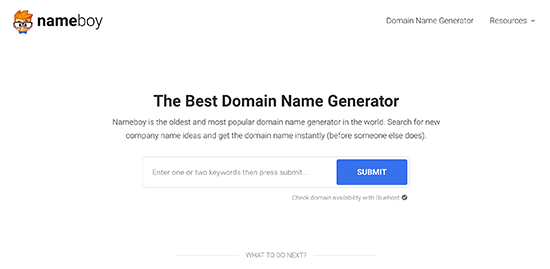
This is where domain name generators come in. These free tools automatically search for your defined keywords to find hundreds of clever domain name ideas.

Nameboy domain generator tool

We recommend using Nameboy, which is one of the oldest and most popular domain name generator tool online. You can also use IsItWP’s domain generator to find more domain name ideas.

11. Act Quickly Before Someone Else Takes it

Each day thousands of new domain names are registered from all parts of the world. If you have found a domain name that you like, then don’t wait too long.

Domain names are like real estate. Thousands of people are actively looking for good brandable domain names that they can register for better rates in the future.

If you don’t act fast, then someone may go ahead and register your domain idea.

Since domain names are relatively cheap, we always recommend our readers to act fast. If you change your mind later, then you can simply let it expire.

Best Places to Buy a Domain Name

How to register your own domain name and how to get one for free

There are hundreds of domain registrars on the web. It’s important to choose carefully because it can be difficult to move your domain later on.

Just like with web hosting, pricing for domain registrations can vary anywhere from $9 to $24. You can even get it for free*.

Let’s take a look at how you can easily buy a domain name.

Free Domain Registration with Web Hosting

Majority of web hosting companies also offer domain registration as a service. Some of those companies offer free domain registration with new hosting accounts.

If you’re starting a new website, then it’s a smart idea to take advantage of this offer and get your domain name for free.

Below are the two WordPress hosting companies that are offering our users over 60% off web hosting, free SSL certificate, and a free domain name:

Bluehost is one of the oldest and largest brand name when it comes to web hosting. They’re an official “WordPress” recommended hosting provider.

iPage powers over 1 million websites and is the most budget-friendly web hosting provider on the web. $1.99 / month for web hosting, and you get a free domain name.

It’s important to keep in mind that most hosts offer free domain registrations for 1 year only. After the first year, your domain registration will renew at usually around $14 per year.

A lot of users take advantage of the free domain for the first year because you would have to pay for the domain name regardless, why not get it for free.

Most Popular Domain Registrars

If you just want to register a domain name without purchasing hosting, then you can do that by purchasing it from a domain name registrar.

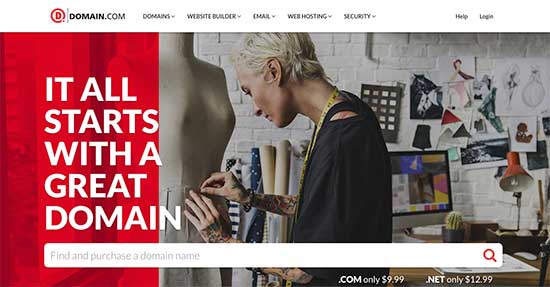
Domain.com is one of the best domain registrars on the market. They offer all top-level domain names, with a smart search feature, premium domains, and all the necessary tools to manage your domain names.

Search for domain name on Domain.com

Domain.com is offering WPBeginner readers a 25% discount, and our domain.com coupon should be automatically applied on your purchase.

GoDaddy is the largest domain registrar in the world. They manage over 63 million domain names for over 14 million customers.

They also offer web hosting plans as well. If you use our GoDaddy coupon code, then you can get a free domain name.

Final Thoughts

If you are starting a blog for the first time, then you may find our ultimate guide on how to start a WordPress blog helpful because it walks you through everything step by step.

You may also want to check out our WordPress and Blogging Coupons page to find the best deal on other web tools and services.

For more domain name ideas, you can see our post on the 14 best free domain name generators.

That’s all. We hope this article helped you understand how to choose a perfect domain name for your blog or business.

If you liked this article, then please subscribe to our YouTube Channel for WordPress video tutorials. You can also find us on Twitter and Facebook.

The post How to Choose the Best Domain Name (11 Tips and Tools) appeared first on WPBeginner.

Source: Wordpres

The post How to Choose the Best Domain Name (11 Tips and Tools) appeared first on TuneMaster.ml.

Twitter co-founder details how editing tweets could work (if they ever implement it)

The Twitter app.

An edit button is high on the list of many a Twitter user’s wishlist, but the company has held out for the longest time. Now, co-founder and CEO Jack Dorsey has revealed how the feature could work — if it’s actually implemented.

In an interview on the Joe Rogan Experience podcast (h/t: 9to5Mac), the Twitter co-founder suggested a “five to 30 second delay” to edit tweets before they’re actually sent (skip to 1:19:50 mark). Dorsey cautioned against this delay lasting too long, so as to preserve the tweet’s “real-time nature.”

The Twitter executive also confirmed the network was looking at the ability to view the original tweet. However, it’s unclear whether this functionality would be for deleted or edited tweets. A similar system is in place for Facebook, allowing users to view the edit history of a tweaked message.

These suggestions don’t necessarily mean an edit button is indeed in the works, but it does show that the company is aware of the demand. Hopefully the company doesn’t take the delayed approach, as one of the biggest reasons to use Twitter is to receive missives with as short a delay as possible.

The podcast has received an overwhelmingly negative reaction on YouTube so far. At the time of writing, the video of the podcast had 60,000 dislikes and 9,500 likes. It’s unclear if the reception is truly organic or the victim of vote-brigading; many of the comments reference censorship and/or politics.

NEXT: Android users aren’t alone, as AT&T’s fake 5G logo now hits iPhones too

Source: Android Zone

The post Twitter co-founder details how editing tweets could work (if they ever implement it) appeared first on TuneMaster.ml.

These are the esports games to watch out for in 2019

The esports industry economy is expected to hit $1.65 billion by 2021, fueled by nearly 250 million esports enthusiasts and another 307 million casual viewers. That revenue and viewer forecast could get even higher based on heavy-hitters like Fortnite and PlayerUnknown’s Battlegrounds officially entering the esports arena in 2019. Whether you’re not familiar with esports or you’re a dedicated longtime fan, we’ve compiled a list of the esports games to watch out for this year.

A few esports games on our list are relative newcomers, while games like Dota 2 and League of Legends are showing their age. They’re all still hot titles and should provide plenty of fun, frenetic gameplay throughout the year. Best of all, you can play in several of the listed tournaments!

Call of Duty: Black Ops 4

esports games to watch

Activision’s latest Black Ops entry launched Oct. 12, 2018 on the PlayStation 4, Xbox One, and Microsoft Windows. It includes a new game mode called “Blackout,” which replaces the traditional campaign with a battle royale mode. However, you won’t see people competing in that mode just yet. The Call of Duty World League (CWL) lists Hardpoint, Search & Destroy, and Control as the battle modes for the 2019 season.

According to the league, the esports format is changing to five-versus-five for 2019. Participants will also get an updated ruleset, the largest Call of Duty esports prize pool to date — a hefty $6 million — and the removal of region restrictions for all LAN-based events. Qualifications for the Pro League — launching Feb. 4 — are also changing, to remove the relegation period and second stage. Teams will receive extra prize money for participating in the CWL Pro League as well.

The second open event of the 2019 season takes place in Fort Worth, Texas during March 15 to March 17. You can watch the show on Twitch here.

Clash Royale

esports games to watch

Developed and published by Supercell, this real-time strategy game arrived on Android and iOS in March 2016. Clash Royale mashes multiple genres into one multiplayer game: Online battle arena, collectible card game, and tower defense. Players battle in one-on-one and two-on-two matches trying to destroy the highest number of opposing towers.

Supercell’s official esports league for 2018 consisted of 40 teams from Asia and Mainland China, Europe, Latin America, and North America. Each team had four to six players, three of which played in one-on-one and two-on-two games on match days. The best team in each region moved on to compete in the Clash Royale League World Finals. To become a pro team member for season one, you needed complete 20 wins in the CRL Challenge in March 2018.

Supercell hasn’t released any details for 2019, but we’ll keep you updated here. Meanwhile, you can watch the Clash Royale League 2018 tournament here.

Counter-Strike: Global Offensive

esports games to watch

Few esports games have had as much impact as Counter Strike: Global Offensive. This first-person shooter developed by Valve and Hidden Path Entertainment launched in 2012 and became an esport the following year. Valve currently sponsors Major Championships (called Majors), in which 24 teams compete for a prize pool of $1 million. The list of hosts over the years include ELeague, Electronic Sports League (ESL), and Major League Gaming (MLG). The first Major of the year will be during Intel Extreme Masters XIII in Katowice hosted by ESL.

Valve changed the Majors format starting with Boston’s ELeague Major in early 2018. The company renamed all three stages, increased the overall team count to 24, and introduced stickers for all participating teams. ESL plans to tweak the Major format again before the Katowice tournament to implement the new Swiss system used in the Chicago Major in November. This pits teams against opponents with the same ELO rankings, rather than pairing teams with opponents of harder or weaker skill.

To see a list of Minor Championships for 2019 not sponsored by Valve, head here. Those sponsored by Valve can be found here. Currently, CS:GO is the most-watched esports game on Twitch and YouTube.

Dota 2

esports games to watch

Just before Dota 2’s launch in 2013, Valve invited 16 Defense of the Ancients esports teams to play the unreleased game in a tournament during Gamecom 2011. Valve held a second tournament in 2012 during PAX Prime, followed by the official launch of The International at the Benaroya Hall in Seattle during 2013. The most recent International event took place in Vancouver, Canada in August 2018, where 18 teams compete for a prize pool $25 million.

Currently the second-most watched esports game on Twitch and YouTube, Dota 2 consists of two teams of five players with the goal of eliminating the opposing team’s Ancient. You can watch The International through Twitch, Steam Broadcasting, YouTube, China’s Gamefy, and in some cases traditional networks. Prize pool money stems from the purchase of a Battle Pass and related in-game items with a starting price of $10.

Fortnite

esports games to watch

The first Fortnite World Cup arrives in late 2019. Qualifiers were originally scheduled for Fall 2018, but they were pushed to sometime in 2019. Epic Games wants the competition open to all Fortnite players rather than sell teams and franchises, or fund third-party leagues. Backing this tournament is a hefty $100 million split between various major and minor events “at different levels of competition.”

Fortnite entered the esports scene in 2018 with its first Pro-Am event, during E3 2018. After that, Epic Games held the Summer and Fall Skirmish series followed by the Winter Royale in December. The next non-World Cup event sponsored by Epic Games will be the Secret Skirmish on Feb. 14 and 15, with a prize pool of $500,000. This event will be invite-only at an undisclosed location.

League of Legends

esports games to watch

Originally launching in 2012, the League of Legends Championship Series (LCS) changed its format in 2016, bringing ten teams into Riot Games’ Los Angeles studios to compete live on Twitch and YouTube. The annual season consists of two local nine-week sessions, with the best three teams of each session moving on to compete in regional finals. After that, the winning team competes with other teams from across the globe in the League of Legends World Championship. Overall, 13 regions follow this or a similar format prior to the global showdown.

The 2018 World Championship saw 24 teams compete for a chunk of the $2.4 million prize pool and the tournament’s coveted trophy. The 2019 schedule started Feb. 2 here in North America and the local Spring Finals are scheduled for April 13 in St. Louis, Missouri. This year Riot Games chose to remove the third and fourth place matches, resulting in only two teams competing for the Spring Split Champion title and the chance to move on to the Mid-Season Invitational.

Both the European and North America leagues also rebranded for the 2019 season — the NALCS is now called the LCS, and the EULCS is now called the League European Championship (LEC).

According to the Esports Charts, the 2018 League of Legends World Championship was the most-viewed tournament of the year.

Overwatch

esports games to watch

Activision Blizzard launched the Overwatch League in 2017. Unlike other esports tournaments, the company chose the traditional sports format with Overwatch, allowing companies and individuals to own teams established in specific cities. Team owners include New England Patriots owner Robert Kraft (Boston), Misfits Gaming CEO Ben Sproont (Miami – Orlando), and New York Mets COO Jeff Wilpon (New York). The roster now consists of 20 established teams spread out across the globe.

The 2019 season begins Feb. 14, with four matches including Philadelphia Fusion taking on London Spitfire, and New York Excelsior competing against Boston Uprising. Activision Blizzard breaks the season down into four five-week stages. The schedule shows Week five of Stage four taking place in Los Angeles at the end of August, so get ready for loads of coverage through the spring and summer. London Spitfire won the 2018 Grand Finals at Barclays Center in Brooklyn, New York, in a two-day showdown that reeled in nearly 11 million viewers.

You can watch the Overwatch League on Twitch.

The League is different than the Overwatch World Cup. Instead of using city-based teams, the World Cup consists of individuals chosen by the community in 32 countries based on their skill rating. These countries are divided into eight groups with four teams in each group. Eventually the top team in each group battle each other across four stages until the final showdown during BlizzCon.

PlayerUnknown’s Battlegrounds

esports games to watch

After announcing a five-year plan to establish an esports presence, PUGB Corp. launched the first season of the official global pro competition for PUBG in January 2019. The competition consists of three phases separated by two global events and an All-Star Games session featuring the best players from each region: North America, Europe, Korea, China, Japan, Chinese Taipai/Hong Kong/Macao, Southeast Asia, Latin America, and Oceania. The 2019 Global Championship concludes in November.

Prior to the new Global Championship, the first major tournament hosted by PUGB Corp. was the 2018 Global Invitational in Berlin, with a prize pool of $2 million. Before that, Bluehole and the ESL conducted an invitational during Gamescom in 2017. Going forward, the PUBG Esports pro competition rules include 16 squads of four players, the Erangel and Miramar maps, a locked first-person perspective, and a global points system.

Head here to watch these sessions on YouTube.

Rocket League

esports games to watch

Developer Psyonix launched the Rocket League Championship Series in 2016. According to Psyonix, Season 7 kicks off 2019 with support for cross-platform play, bringing in gamers on the Nintendo Switch, PlayStation 4, Xbox One, and PC through Steam. The North American qualifiers begin March 2, while the European qualifiers begin March 3. South America becomes an official region in this season as well, though details regarding the qualifiers will be released “in the coming weeks.” League play begins April 6 in North America and April 7 in Europe.

Psyonix previously increased the prize pool to $1 million in Season 6, and added another $100,000 for the Rival Series. Introduced in Season 4, the Rival Series is a secondary league composed of the top eight teams that didn’t qualify for the Championship Series. After a five-week duel, the top two teams emerge to compete against the seventh and eighth place Championship Series teams. Rival Series League Play begins April 12.

You can livestream the events on Twitch and YouTube.

Super Smash Bros. Ultimate / Splatoon 2

esports games to watch

Nintendo’s first tournaments for the year starts in February and anyone can participate. For the Super Smash Bros. Ultimate North America Open 2019, Nintendo will conduct three online qualifying sessions on Feb. 2, Feb. 16, and March 9 in four regions across North America: northeast, southeast, southwest, and northwest. The final showdown will include players from Mexico and Canada during the PAX East gaming convention in Boston on March 30, 2019. You can read the official rules here, or if you’d simply rather watch, the online qualifiers and final match will be livestreamed.

For the Splatoon 2 North America Inkling Open 2019, the schedule is slightly different. Captains must register their team and an additional player between January 22 and February 10. After that, teams will qualify for the tournament in Ink Pools on Feb. 10. The top eight teams will include players from Canada and Mexico to compete in the qualifier finals on March 2. Only four teams will make the trip to PAX East in March to compete in the final showdown. You can read the official rules here.

So that’s it for our list of some of the best esports games that we expect to be big (or continue to be big) in 2019. Any others we missed? Let us know in the comments.

Source: Android Zone

The post These are the esports games to watch out for in 2019 appeared first on TuneMaster.ml.